
The AI Power-Worker Series ① Connecting APIs: Hook Up External Services Without Knowing Code
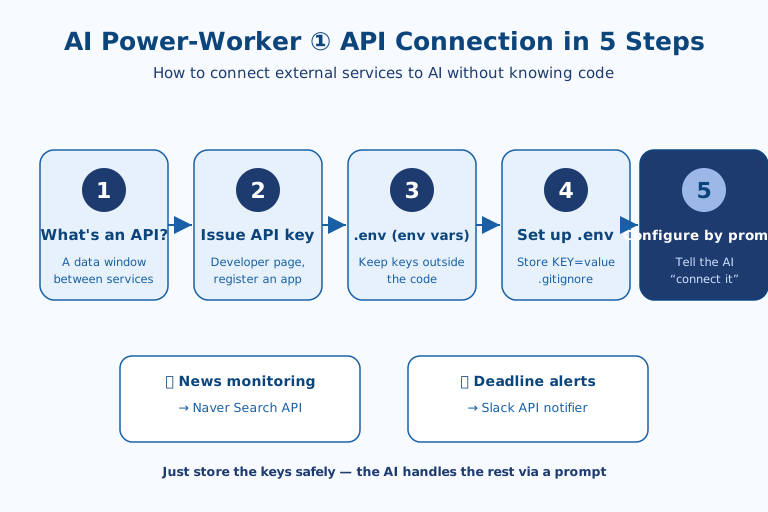
To put AI to work, you first need to connect an "API" that links external services — and you can do it without knowing how to code, in these five steps: ① understand what an API is, ② issue an API key, ③ understand .env (environment variables), ④ set up .env, and ⑤ configure it with a prompt. The core idea is to store your secret keys safely, then hand the actual connection code off to an AI like Claude Code via a prompt. Once you grasp the basics in this Part 1, you'll be able to put them to use right away starting with Part 2 (news monitoring).
Why These Five Steps Matter to Non-Coders Now
Connecting a single API used to mean writing the request syntax, auth headers, and response parsing yourself. "Connecting" was therefore a developer's job, and planners and marketers would hand a request over and wait days. What makes these five steps meaningful now is that the execution part — writing the code — has moved to the AI. What's left for the non-coder shrinks to two things: preparing the key safely, and stating clearly what you want. The skill to learn isn't coding; it's how to delegate coding.
An API Is, in the End, a "Window"
An API is the "service window" through which different programs exchange data. Think of it like a restaurant: instead of walking into the kitchen (the service) yourself, you place an order with the server (the API) and your food is brought out to you. When your tool asks a service like Naver or Slack, "Give me this data," the service returns a response in a defined format.
In a work setting, it's used like this:
- To monitor competitors' news coverage → automatically collect relevant articles via the Naver Search API
- When you don't want to miss a deadline → automatically send deadline alerts via the Slack API
- To automate daily, repetitive data collection → call that service's API
In other words, an API is the connecting channel that lets a program take over "the work a person used to do by manually logging in and copying." The more a task is a repeating rule — searching, collecting, alerting — the bigger the payoff; work that requires judgment still belongs to a human.
Issuing a Key: Making a One-Time "Access Pass"
You get an API key by logging into each service's developer center, registering an app (application), and selecting the features you'll use. It usually comes as a pair of a Client ID and Client Secret, or as a single long string token. The common procedure is as follows:
- Log into the relevant service's developer center (e.g., Naver Developers, the Slack API page).
- Click "Register Application" or "Create App" to create an app.
- Select the feature you'll use (e.g., search), and a key is issued.
This key is essentially an "access pass," so if it's exposed, others can use the service with your permissions — never post it anywhere public. Issuing is usually a one-time task, but a leak is hard to undo; it helps to keep that asymmetry in mind.
Why `.env`: Separating Code From Secrets
.env is a configuration file that gathers your "environment variables." An environment variable is a value that isn't written directly into the program's code but is read from the outside environment when the program runs. You use them to keep values that are secret (like API keys) — or that change depending on the situation (like development vs. production) — separate from the code.
If you hardcode a key directly into the code, the moment you share that code or push it to GitHub, the key leaks wholesale. You'd also have to edit the code every time the value changes. That's why the standard practice is to pull these values out into a .env file as environment variables and have the code "read those values from the environment." This is a long-standing developer convention, not a rule ASAP invented, so you can follow it with confidence.
.env is a simple text file written one NAME=value per line, and the NAME you write here becomes the name of the environment variable the code calls on.
The Actual Setup: Two Lines and One Line
Create a .env file in your project folder, write your keys one NAME=value per line, and add .env to .gitignore to exclude it from sharing. For the Naver Search API, you'd add two lines: NAVER_CLIENT_ID and NAVER_CLIENT_SECRET.
NAVER_CLIENT_ID=your_issued_id
NAVER_CLIENT_SECRET=your_issued_secret
Then, to make sure the keys aren't uploaded by accident, add the following line to your .gitignore file:
.envThis way, the keys stay only on your own computer, and the secret values are left out even when you share the code. The core principle is: "Keys go in .env, and .env is never shared."
Delegating to a Prompt Instead of Code
Once the keys are ready, you can hand the actual connection code off to an AI like Claude Code via a prompt. Without writing any code yourself, just describe what you want to do, and the AI will produce code that reads the keys from .env and calls the API. For example, you'd request:
Using NAVER_CLIENT_ID and NAVER_CLIENT_SECRET from .env,
fetch the 10 latest news articles about "Burger King" via the Naver Search API,
and organize the titles and links.
Don't write the keys directly in the code — read them from .env.
By spelling out "the result you want + read keys from .env" together like this, you complete automation tailored to your needs.
ASAP's Take: Limits and Open Questions
The real barrier here isn't code; it's two other things. First, the moment you handle keys, even a non-coder needs a minimum of security instinct. The single habit of adding .env to .gitignore prevents accidents — and that habit is easier to forget than any line of code. Second, if you run AI-generated code without understanding what it does, no one is left to catch a wrong request or an excessive call. So "you don't need to know code" does not mean "you don't need to review the results." Free search calls typically have daily limits, and each service's terms of use differ — both are worth checking before you put this into real use. In the next installment, Part 2, we'll use this exact approach to automatically compile competitors' news trends via the Naver API and export them to a PowerPoint deck.
References: Naver Developers · Claude Code Official Documentation

AI & tech,
read in depth
Beyond the headlines — into the context and the structure
AGI Soon As Possible · asapai.co.kr