
7 Ways to Use Claude Code at Work
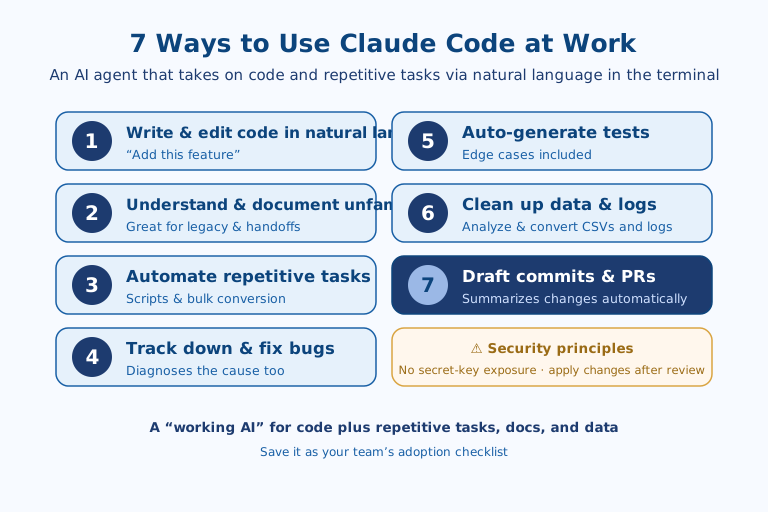
Claude Code is Anthropic's AI coding agent that lets you delegate code and repetitive tasks in natural language from your terminal, and at work it's most effective in these seven ways: ① writing and editing code in natural language, ② understanding and documenting unfamiliar code, ③ automating repetitive tasks, ④ tracking down and fixing bugs, ⑤ auto-generating tests, ⑥ cleaning up data and logs, and ⑦ drafting commits and PRs. It's less a simple code generator and more a "working AI" that actually reads and edits files and runs commands. When adopting it, it's wise to follow security principles too — prevent secret-key exposure and apply changes only after review.
1. Writing and Editing Code in Natural Language
The basic use of Claude Code is having it write and edit code in natural language, as in "add this feature." Without hunting down file names or functions one by one, you describe the behavior you want and it creates and edits code across multiple files. Because it shows you the changes before applying them, you can use it safely in a flow where a human reviews first and then commits.
2. Quickly Understanding an Unfamiliar Codebase
It's especially useful when you need to understand a project you're seeing for the first time or legacy code handed off to you. Ask "explain what this module does," and it lays out the code's structure and flow, even explaining the behavior of code with no comments or documentation. When you join a new team or work on an old system, it greatly reduces the time it takes to get up to speed.
3. Automating Repetitive Tasks
Repetitive work — applying the same change across dozens of files or bulk-converting data — can be automated with scripts. Instruct it like "change the format in every file in this folder," and it writes the script itself and even runs it. It cuts simple work that would take half a day by hand down to a few minutes, freeing people to focus on tasks that require judgment.
4. Tracking Down and Fixing the Cause of a Bug
Give it an error message or symptom and it carries you from diagnosing the cause to fixing it. It finds and reads the relevant code, forms a hypothesis about why the problem occurs, fixes it, and then runs it directly to confirm if needed. With a single sentence — "find out why this error happens and fix it" — you can delegate the repetitive cycle of debugging.
5. Auto-Generating Test Code
Having it write test code for a feature you've built can quickly raise quality. Ask "write tests for this function, including edge cases," and it produces tests that check not just normal behavior but exceptional situations as well. It's effective at reducing the time spent writing tests while increasing coverage.
6. Cleaning Up and Analyzing Data and Log Files
Beyond development, you can use it to clean up and analyze files like CSVs and logs. Request something like "summarize the frequency of errors in this log as a table" or "merge and summarize these CSVs," and it reads the files directly to process and summarize them. Even if you're not on the data team, you can handle simple aggregation and cleanup tasks right in the terminal.
7. Drafting Commits and PRs
After you finish a change, you can also delegate drafting the commit message and pull request (PR) description. Because it summarizes what was changed and why, the burden of writing an explanation every time is reduced and the consistency of your records improves. The more collaboration-heavy a team is, the more it helps reviewers grasp context quickly, speeding up reviews.
Where to Start: A Rollout Order
Trying to adopt all seven at once tends to make adoption harder, not easier. In practice it's faster to start where the risk is low and verification is easy. A sensible first step is #6 (cleaning up data and logs) and #2 (understanding code). Both produce read-and-summarize output that never touches the original files, so there's nothing to undo if something goes wrong, and a human can confirm the accuracy of the result at a glance.
Once low-risk tasks have built your intuition, it's natural to move on to work that actually changes files, like #3 (automation) and #4 (bug fixing). From here on, the property that Claude Code "shows you the change before applying it" becomes the key safeguard. #5 (tests) and #7 (commit/PR drafts) are better bolted on last: tests and records only carry weight once the code has been somewhat cleaned up by the earlier steps. In the end this order reads as a way of building trust along an axis of "easy to reverse → hard to reverse."
What Korean Development Teams Should Watch For
Two points make this tool especially valuable in the Korean workplace. One is handovers and legacy. In organizations where staff turnover is frequent and documentation tends to slip, #2's ability to "explain even undocumented code" pulls knowledge that used to live in people's heads back out of the code itself. This works in the direction of easing the problem of knowledge being tied to a single individual.
The other is the language barrier. A structure where you give instructions in natural language and get results back in natural language lowers the entry barrier for practitioners who find English documentation and English error messages daunting. That said, context like Korean-language variable names, in-house terminology, and domestic regulatory or security policy is not something the tool picks up on its own — so the habit of stating that context explicitly in your instructions determines the quality of the output. Spelling out "what and why" works far better than expecting it to "just handle it."
Limits to Know Before You Delegate
The most common misconception when actually using these seven is the idea that delegating means you're done. Claude Code showing you a change before applying it is, in the end, a design that assumes human review. Skip the review and apply changes as-is, and edits that look plausible on the surface but diverge from your intent can accumulate. #4 (bug fixing) and #3 (automation) in particular actually change files, so delegating them without a backup or version control should be avoided.
Security isn't kept for you by the tool either. The secret-key exposure principle mentioned at the outset is a discipline a person has to consciously uphold, not a feature that is guaranteed automatically. Finally, a passing test the tool wrote (#5) or a commit description it drafted (#7) does not mean the code is correct. A test verifies only as much as the criteria a person set, and a summary can be trusted only after a human re-reads the actual change. In short, Claude Code is a tool that lifts the burden of repetition and exploration — not something that takes over judgment and responsibility.
References: Claude Code Official Documentation · Anthropic

AI & tech,
read in depth
Beyond the headlines — into the context and the structure
AGI Soon As Possible · asapai.co.kr