
7 Copy-Paste Email Prompts: From Declines, Nudges, and Apologies to English Business Emails
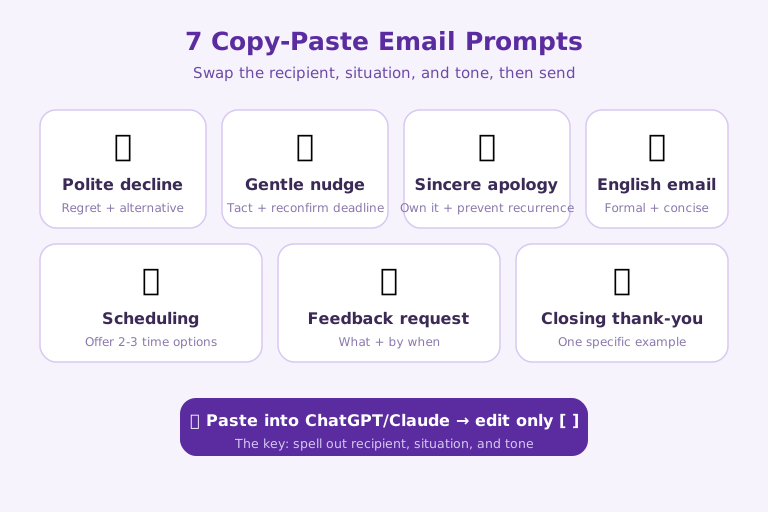
Here are the seven email situations you'll face most often at work, distilled into prompts you can copy and use right away. Paste them into ChatGPT or Claude, swap only what's inside the brackets [ ] for your own situation, and the time you'd spend agonizing over awkward phrasing disappears. They are: (1) a polite decline, (2) a gentle nudge, (3) a sincere apology, (4) an English business email, (5) scheduling coordination, (6) a request for feedback, and (7) a closing thank-you. The key is to spell out "the recipient, the situation, and the tone you want"—that's what produces an email ready to send with a single paste.
1. Declining politely
The key to a decline is drawing a clear line without harming the relationship, so you instruct the AI to include regret, a reason, and an alternative. It's especially effective with parties where maintaining the relationship matters, like clients.
Write a reply email that politely declines the request below.
- Recipient: [client / maintaining the relationship is important]
- Reason for declining: [scheduling makes it difficult to proceed this quarter]
- Tone: regret + reason for declining + offer an alternative + mention a future opportunity
- Length: 5–6 sentences, and include a subject line
2. Nudging gently
When you're following up on something unanswered or past its deadline, you need wording that prompts action without being pushy. The secret to a gentle nudge is leaving room for the possibility that the other person simply forgot.
Write a reminder email that gently re-requests the following.
- What was requested: [review of the quote I sent last week]
- Situation: [the reply was due yesterday]
- Tone: no pressure, with consideration that you've likely been busy + reconfirm the deadline
- At the end, politely state the reply deadline once more
3. Apologizing sincerely
In an apology email, owning the mistake and preventing a recurrence must come before excuses for trust to be restored. Ask the AI to pinpoint specifically what went wrong and to offer a solution alongside it.
Write an email that sincerely apologizes for the following mistake.
- Mistake: [the delivered materials contained incorrect figures]
- Impact: [the recipient used them as-is in their report]
- Structure: acknowledge the facts + apologize + cause + measures to prevent recurrence + guidance on the corrected version
- Tone: a responsible attitude with no excuses, not overdone
4. Writing an English business email
An English email has to be both formal and concise, so the fastest approach is to provide a Korean draft and have the AI polish it into a business tone. If you get the subject line too, you can send it as-is.
Turn the following into a polite English business email.
- Korean draft: [The delivery looks likely to be delayed by two weeks; I'd like to ask for your understanding and have attached the new schedule]
- Keep it formal but concise, with short sentences
- Also propose a subject line for the email
5. Coordinating schedules
When setting up a meeting, an email that gives the recipient easy-to-pick options speeds up their reply. Instruct the AI to narrow the candidate times down to two or three.
Write an email to set up a meeting.
- Purpose: [kickoff meeting for the new project]
- Candidate times to propose: [Tue 10 a.m. / Wed 2 p.m. / Thu 4 p.m.]
- Duration: [30 minutes], Format: [pick one: video call or in person]
- Tone: make it easy for the recipient to choose a convenient time, concise
6. Requesting feedback or a review
When asking for a review, you'll only get the answer you want if it's clear what to look at, by when, and from what angle. Rather than a vague "please take a look," ask the AI to pin down specific review points.
Write an email requesting a review of materials.
- Subject of review: [the attached draft proposal]
- Points I'd like reviewed: [direction / budget line items / realism of the timeline]
- Deadline: [by this Friday]
- Tone: ease the burden but keep the deadline clear
7. Closing with a thank-you
A thank-you email after collaboration or help feels more sincere the more specific the details you point to. Instruct the AI to single out one thing that was helpful.
Write a thank-you email.
- Recipient: [the partner-company contact I just finished a project with]
- Point of thanks: [quickly sharing materials despite a tight schedule]
- Tone: not formulaic, mention one specific example + express hope for future collaboration
- Keep it short, 3–4 sentences
The design principle running through all seven prompts
Line the seven prompts up side by side and, though the situations differ, the skeleton is the same. Each one fills the same four slots: recipient (who), situation (what happened), tone (what attitude), and format (length, structure, subject line). Most of the reason AI spits out an awkward email is that one of these four slots was left empty. Leave the tone unspecified, for instance, and the model defaults to sentences that are either overly formal or excessively chummy. That is why this pack writes an explicit "Tone" line into every prompt.
The other shared pattern is nailing down "the shape of the output" in advance. The decline email specifies a length ("5–6 sentences, and include a subject line"), the thank-you does the same ("keep it short, 3–4 sentences"), and the apology fixes the order of components ("acknowledge the facts + apologize + cause + measures to prevent recurrence + guidance on the corrected version"). Fixing the output format this way leaves the model less room to wobble as it decides paragraph count and ordering on its own, so you get a draft of consistent quality each time. This format-fixing is precisely what turns a prompt into a reusable template.
What to watch for as a non-native or global professional
These prompts read less like something written from scratch and more like a general guide, built around English-language email conventions, adapted for everyday practice. So when you use them across different workplace cultures, a few tweaks remove the awkwardness. First, titles and seniority: the AI handles polite forms well but does not know your organization's internal customs or honorifics, so it is safer to write not just the relationship but the exact title you will use into the "Recipient" slot. Second, in apology and decline emails some languages call for more cushioning, indirect phrasing than English, so adding "not too blunt" to the "Tone" slot yields sentences that fit the practical feel better.
The English business email prompt (number 4) is especially useful for non-native writers. Writing out clearly, first, what you want to say in your own language and then handing the translation and formalizing to the AI is faster and more accurate than getting stuck trying to compose in English from the start. That said, the AI can silently alter or fabricate proprietary details like a company name, a job title, or figures, so before hitting send you need to eyeball the draft and confirm that the factual items you put in brackets came through unchanged.
This pack's limits, and how to shore them up
A copy-paste prompt only gets you to a fast starting point; it does not replace the final check. An AI-generated draft can contain hallucinated facts, promises stronger than reality warrants, or idioms that do not fit the situation. The more a relationship is on the line—apologies and declines above all—the safer it is to have a person polish at least one or two of the key sentences rather than sending the draft as-is. The reason this pack's prompts specify "length" and "structure" is exactly this: to make the review points predictable and cut the time you spend checking.
The practical way to shore up the limits is two steps. First, after getting a draft from the prompt, ask once more—"Point out any wording in this email the recipient might misread, or any promise that's overdone"—so the model checks itself. Second, for situations you use often, save the completed prompt with the brackets already filled in as a note or snippet; then you can reuse it by swapping only the situation instead of rewriting it every time. A prompt is less a one-off incantation and more an asset you refine and stockpile.
References: OpenAI - Prompt Engineering Guide · Claude Code Official Docs

AI & tech,
read in depth
Beyond the headlines — into the context and the structure
AGI Soon As Possible · asapai.co.kr