
7 Copy-Paste Prompts for Reports and Meeting Notes: From Weekly Updates to Action Items
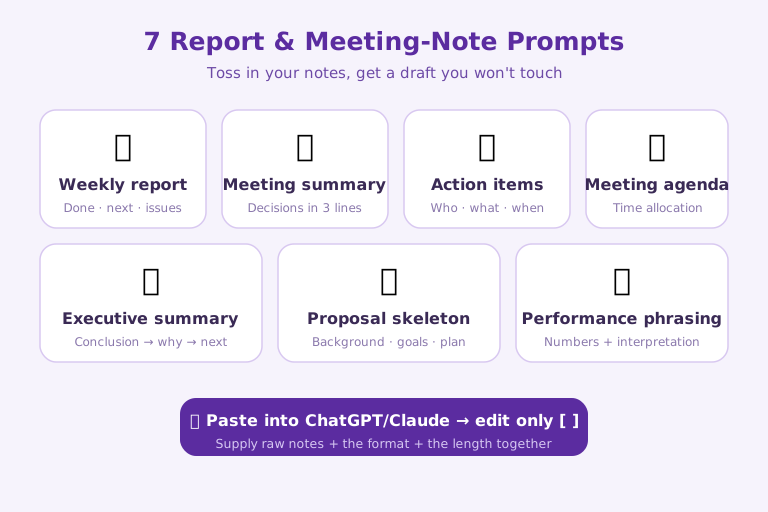
The seven workplace tasks that eat up the most time, reports and meeting write-ups, are bundled here as prompts you can copy and use right away. Paste them into ChatGPT or Claude, swap only what's inside the brackets [ ] for your own notes, and the time you spend staring at a blank page disappears. The set covers: (1) a weekly report draft, (2) a 3-line meeting summary, (3) action-item extraction, (4) building a meeting agenda, (5) an executive summary, (6) a proposal skeleton, and (7) turning performance numbers into prose. The key is to supply your raw notes plus the format you want plus the length together, which is exactly what produces a draft you don't have to touch.
1. Drafting a Weekly Report
The heart of a weekly report is structuring it so that "what I did, what's next, and the issues" are visible at a glance, so you just hand over your scattered notes and let the model sort them into three sections. Capping the number of bullets per section keeps it from getting wordy.
Turn my work notes from this week into a weekly report draft.
- Notes: [2 client meetings, draft of new proposal, server maintenance delayed]
- Structure: Done this week / To do next week / Issues & help needed
- Max 3 bullets per section, in a concise reporting style
2. Summarizing Meeting Notes in 3 Lines
The longer the meeting notes, the less they get read, so have the model compress the whole thing into 3 lines focused on decisions. The trick is to instruct it to lead with the conclusion.
Summarize the meeting below in 3 lines.
- Meeting content: [paste the transcript or notes]
- Format: 3 lines focused on key decisions, one sentence per line
- Cut the filler and lead with the conclusion
3. Pulling Action Items into a Table
For a meeting not to fizzle out, "who, what, and by when" has to be clear, so instruct the model to pull out only the to-dos as a table. Have it leave items with no set deadline as "TBD."
From the meeting below, extract only the to-dos (action items) and organize them into a table.
- Meeting content: [paste the transcript or notes]
- Table columns: Owner / Task / Due date
- Mark any unstated deadline as "TBD"
4. Building a Meeting Agenda
Give it the meeting's purpose and length, and you get an agenda that even allocates time, which keeps the meeting from dragging on. Having it spell out a discussion goal for each item makes things sharper.
Build an agenda for the following meeting.
- Purpose: [finalize Q3 marketing direction]
- Length: [60 min], Attendees: [Planning, Design, Sales]
- For each item, show the estimated time and the discussion goal
5. Writing a One-Paragraph Executive Summary
With long reports, leadership reads the summary first, so have the model produce a short summary ordered as conclusion, evidence, then next steps. Asking it to unpack the jargon means even non-specialists understand it immediately.
Turn the report below into an executive summary.
- Report: [paste the body]
- Structure: Conclusion → 3 key supporting points → Next steps
- Max 5 sentences, with jargon spelled out
6. Sketching a Proposal Skeleton
A proposal is daunting to start from scratch, so give it only the topic and let it frame a skeleton using a standard structure (background, goals, execution, expected impact). Getting a set of fill-in questions for each section makes it easy to flesh out.
Sketch a proposal skeleton on the following topic.
- Topic: [introducing an in-house AI training program]
- Structure: Background / Goals / Execution plan / Timeline / Expected impact
- For each section, include a 2-3 line guide plus questions for me to fill in
7. Turning Performance Numbers into Report Sentences
Performance needs to show meaning rather than just list numbers, so have the model attach changes and context to the figures and turn them into report sentences. Getting a one-line takeaway with no exaggeration keeps the report clean.
Turn the figures below into performance report sentences.
- Figures: [1,240 visitors (+8.4% vs. last week), 18 inquiries]
- Tone: facts + interpretation of the change + a one-line takeaway
- No exaggeration, in a reporting style of 3-4 sentences
The Three Ingredients Running Through All 7 Prompts
Line the seven prompts up side by side and a common skeleton emerges. Every one of them is built in the same order: raw notes (the material) → the format you want (the structure) → length and tone (the constraints). These three do different jobs. The raw notes pin down where the facts come from so the model doesn't invent anything; the format locks in ahead of time what shape the output takes; and length and tone cut down how much you have to edit afterward. This is, in fact, the same order a person runs through in their head when writing a report from scratch. A prompt is simply that mental order written out where the model can see it.
So when the result disappoints, look at which of the three is missing. If off-topic content crept in, the notes were thin; if the shape comes out different every time, the format was vague; if it runs long, the length constraint was left out. In prompt 3, for instance, the "Owner / Task / Due date" columns are the format, and "mark as TBD" is the exception rule. Without that one line of exception handling, the model is prone to inventing a plausible deadline that was never stated. The hidden thread across this pack is that the better a work prompt is, the more it decides in advance what to do when something is absent.
What to Adjust Before Using These As-Is
Because these prompts hand you only a frame, fitting them to a real office context means swapping a few spots for your own organization's language. The first is reporting style. Documents that go up the chain, like the executive summary in prompt 5, follow different preferred sentence lengths and levels of formality at every company, so it's safer to add a line to the prompt specifying whether you want a terse bulleted style or a fuller narrative one. The second is titles and department names. Replace the attendees "Planning, Design, Sales" in the agenda prompt with your actual team names, and the model will allocate agenda time around those teams' concerns.
The sensitive part is information leakage. Prompts like 2 and 3 that have you paste an entire meeting transcript are convenient, but that also means client names, contract figures, and personnel matters go straight into an external AI service as-is. If your company's security policy restricts feeding data into external generative AI, the rule is to anonymize proper nouns to "Company A / Customer B" before pasting, or to use an internally approved tool. Convenience and data protection are a trade-off, so this pack delivers its power most safely on "meetings where anything can go in."
Limits and Verification: It's Only a Draft, and Facts Are Still Your Responsibility
What these prompts produce is a draft, not a finished document. Especially in number-heavy work like the performance phrasing in prompt 7, the model can quietly alter your original figures while calculating a percentage change or polishing the wording. You need a step where, after pasting, you check the output against the original to make sure "+8.4%" didn't turn into a different number somewhere. The same goes for the executive summary in prompt 5: a single supporting point can drop out entirely during summarization, or a nuance can get overstated, so a person has to confirm the conclusion doesn't contradict the source report.
Put another way, the real value of this pack isn't in replacing judgment but in erasing the time spent on first-pass tidying. Hand the repetitive labor to the model, seating scattered notes into a structure, drawing the table, matching the sentence tone, but deciding which decision matters, which number is right, and who is accountable is still a human's job. That's ultimately where people who prompt well and people who don't diverge, too: whether they post the draft as-is, or point to the gap among the three ingredients and refine it once more.
References: OpenAI - Prompt Engineering Guide · Claude Code Official Docs

AI & tech,
read in depth
Beyond the headlines — into the context and the structure
AGI Soon As Possible · asapai.co.kr