
7 Prompt Formulas for Getting AI to Do Great Work
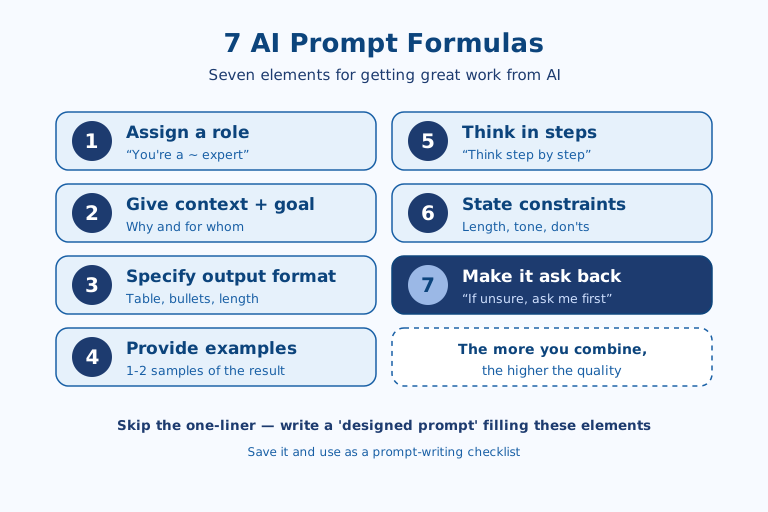
To get the results you want from AI, skip the one-line question and write a "designed prompt" that fills in seven elements: (1) assign a role, (2) give context and the goal, (3) specify the output format, (4) provide examples, (5) think in steps, (6) state constraints and prohibitions, and (7) make it ask back. These seven are shared principles that work on any chatbot—ChatGPT, Claude, Gemini—and the more you combine them, the higher the accuracy and polish of the answers. Save the formulas below like a checklist and they'll be handy to use.
1. Assign a role
If you first give the AI a role—what kind of expert it should answer as—the level and tone of its response fall into line. Set a role like "You're a marketer with 10 years of experience" or "You're a meticulous code reviewer," and the AI answers with that perspective's vocabulary, standards, and priorities. For the same question, the version with an assigned role produces a far more professional and consistent result.
2. Give context along with the goal
When you provide context—what the task is for and who it's aimed at—the AI doesn't bark up the wrong tree. Tell it the purpose, audience, and situation, as in "I'm going to make a 5-minute presentation for new hires," and the AI tunes the difficulty and length of its answer accordingly. Without context, you tend to get plausible-sounding but not-very-useful generalities.
3. Specify the output format
Specifying the format of the result you want in advance dramatically cuts post-processing time. Nail down the format and length—"organize it into a table," "five bullets," "within 300 characters," "in JSON"—and you get it in a form you can use right away. Leave the format blank and you get long, scattered prose you'll have to rework.
4. Show examples
Showing one or two examples of the result you want makes the AI follow the pattern precisely. The approach is to attach a sample of a good answer or an example written in the style you want—this is called "few-shot." Even a tone or structure that's hard to explain at length in words comes across in one go with a single example.
5. Have it think in steps
For complex problems, asking the AI to "think step by step" boosts accuracy. Ask for an answer all at once and it skips reasoning; have it solve in steps and it answers while checking the intermediate work. The more a task involves calculation, analysis, or logic, the greater the effect of this one sentence.
6. State constraints and prohibitions
Writing down not only what to do but what not to do stabilizes the result. Set the length, tone, and prohibited items—"don't use jargon," "facts only, no speculation," "don't exceed 500 characters"—and the AI won't cross the line. Especially for tasks where factual accuracy matters, "if you don't know, say you don't know" is effective at reducing hallucinations.
7. Make it ask back when it's short on information
Instructing the AI not to answer right away when information is lacking, but to ask first, prevents off-target results. The method is to add a single sentence: "If you're short on information, don't guess—ask me first." Instead of the AI filling in the missing conditions on its own and answering wrongly, it asks back for the information it needs, leading to an accurate result.
Sequencing the seven: what to lead with
Listing all seven elements is not the goal; stack them mechanically and the prompt just gets bloated. Which ones matter most depends on the task. For fact-sensitive research or summarization, (6) constraints and (7) ask-back come first, because "if you don't know, say so" and "ask before guessing" block hallucinations and wrong turns at the same time. For open-ended work like drafting, where you only need to set a direction, (1) role and (2) context decide roughly eight-tenths of the outcome. For repetitive work with a fixed shape, it's better to build (3) output format and (4) examples once and reuse them as a template.
You also don't need to cram all seven into one prompt. Filling in just the first three—role, context, format—already makes most everyday tasks noticeably better. The remaining four are best treated as "debugging knobs" you add one at a time when a result goes off: add context when the answer is vague, an example when the format is messy, step-by-step thinking when the logic slips, and constraints plus ask-back when it keeps making things up.
Notes for applying this in practice
When you instruct in Korean specifically, it's more reliable to express the length limit in (3) output format as a number of sentences or items rather than a character count. AI often fails to count Korean characters precisely, so a "within 300 characters" rule frequently goes unmet; switching to easy-to-count units like "within 3 sentences" or "5 bullets" raises compliance. For formal documents like internal reports or proposals, pasting one previously approved document whole as an (4) example is far faster than describing the tone in words.
For translation and review work, it helps to pin down (6) constraints per language unit. Spelling out what must not be touched—as in "leave proper nouns and code exactly as in the source and translate only the rest"—prevents over-translation. And when handling internal data or non-public information, (7) ask-back is a risk-management device as much as an accuracy one. Making the AI ask "where do I confirm that figure?" instead of plausibly filling in a fact it doesn't know cuts off misinformation at the source before it spreads unverified.
Limits and caveats of these formulas
Prompt design is not a cure-all. Recent facts absent from the training data, or non-public internal information, will not come out accurately no matter how precisely you instruct. What you need in that case is not a better prompt but supporting source material attached alongside. It's worth distinguishing that the seven elements are a technique for "drawing out knowledge the model has," not for "manufacturing knowledge it lacks."
It's also worth guarding against the misconception that piling on elements always helps. As instructions grow long and conditions multiply, the model may drop some of them or arbitrarily pick one when conditions conflict. (5) Step-by-step thinking, too, only lengthens the answer with little gain when attached to simple questions. In the end, these formulas are better understood not as a fixed answer but as the starting point of an iterative process—looking at the result and adding or removing only the elements you need. A good prompt is less something completed in one shot than something you tune by turning one knob at a time as you see where it went off.
References: Anthropic Prompt Engineering Guide · OpenAI Prompt Guide

AI & tech,
read in depth
Beyond the headlines — into the context and the structure
AGI Soon As Possible · asapai.co.kr