
Coding AI: when to use autocomplete, chat, or an agent
Why think in "modes," not "tools"
When people discuss coding AI, they usually name a product first. But autocomplete, chat, and agent often live inside the same product. So which mode you turn on right now matters more than which product you use. In ASAP's view, this distinction matters because the common hope that switching tools will lift your results usually mistakes a mode-selection problem for a tool problem. The three modes below share a similar natural-language interface, yet the problem each one solves is different.
The three modes solve different problems
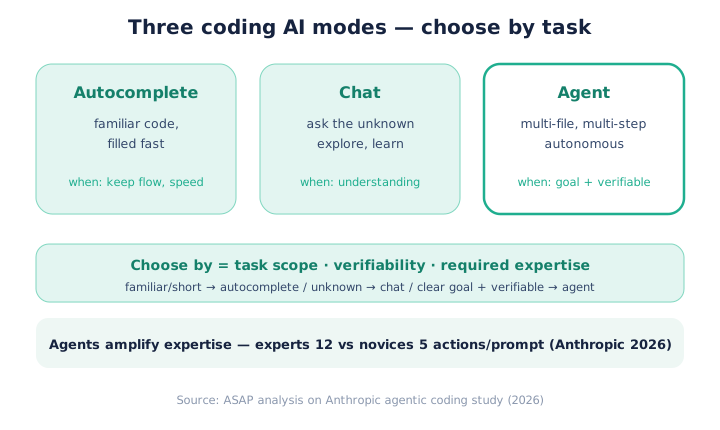
The three modes of coding AI are each designed for a different task. Autocomplete fills in familiar code fast without breaking your flow. Chat is for asking what you don't know and getting explanations. An agent autonomously executes multi-step work across many files. None of them replaces the other two.
The axis that separates the three modes, in one line, is how much the human stays in the loop. With autocomplete the human keeps typing and approves each line instantly. With chat the human asks, reads the answer, and moves it over by hand. With an agent the human gives only the goal and delegates execution. Less involvement looks easier, but ASAP notes it also raises the cost of undoing a mistake when one slips through.
How to choose by task
Mode choice is decided by the task's scope, verifiability, and required expertise. The table below is the rule.
| Mode | Best-fit task | Key condition |
|---|---|---|
| Autocomplete | Familiar patterns, short lines | Keep flow and speed |
| Chat | Exploring, learning, one-off snippets | Understand the unknown |
| Agent | Multi-file, multi-step, repetitive work | Clear goal + verifiable |
If the task is familiar and short, use autocomplete; if it is unfamiliar, use chat; if the goal is clear and the result is verifiable, the agent is the answer.
The trick to reading this table is to weigh "verifiability" most heavily of the three conditions. Even when the scope is broad and expertise is needed, if you can confirm the result with a test or with your own eyes, it is worth handing to an agent. Conversely, no matter how small the task, if there is no way to tell whether it is right, it is not a candidate for automation. ASAP suggests asking "how would I know if this result is wrong" before choosing a mode.
Agents amplify expertise
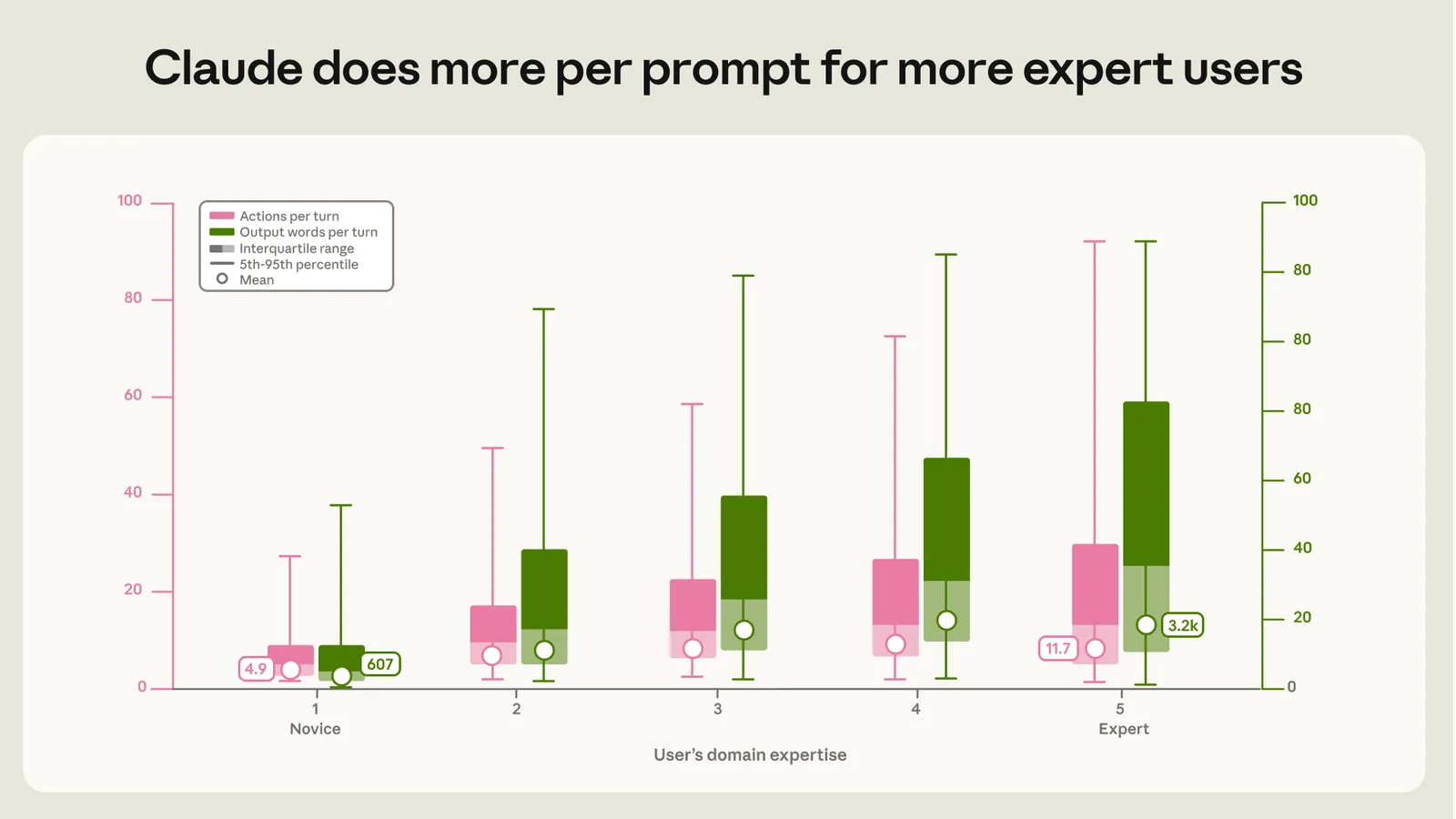
The agent mode does more work the more expertise a person brings. In Anthropic's 2026 analysis, expert sessions drew 12 actions per prompt, more than double the novices' 5, and reached a verified success rate of 28-33% versus 15% for novices. The person who knows what to ask and how is the one who drives an agent well.
ASAP reads these numbers this way: an agent is not a tool that fills in skill but one that multiplies it. Experts break a goal into pieces, verify intermediate results, and steer direction, so they pull more valid actions out of a single prompt. Novices cannot set direction with the same tool, so they take fewer actions and a smaller share of them land. In short, the hope that adopting agents alone will level a team's skill does not match this data; it may instead widen the gap between those who know and those who don't.
What this means for practitioners
This distinction applies directly to engineering teams. The more an organization has tight code review and solid tests, the more the "verifiability" of agent output is already secured, so it gains more from agent mode. Conversely, when a team with shallow verification hands a large task wholesale to an agent, there is no net to catch wrong code, and the risk grows. In ASAP's view, the priority now is to build verification infrastructure like tests and review before adopting the tool. Only then does the condition for an agent to multiply skill hold.
Common misuse
The most common mistake is handing a non-verifiable task wholesale to an agent. When the goal is vague or there is no way to check the result, the agent produces plausible but wrong code at scale. Conversely, asking chat for a single familiar line only breaks your flow. Matching the mode to the task draws more output from the same tool.
Limits and ASAP's view
There are limits worth flagging. The figures above come from Anthropic analyzing sessions of its own tool, Claude Code, so we cannot assume the same ratios hold unchanged for other coding AI. How "expert" and "novice" were split, and how actions and verified success were counted, also leave room for interpretation. Even so, the direction — that greater expertise lets an agent do more work — does not clash with practical experience, in ASAP's view. Rather than memorizing the numbers as gospel, the habit of judging your own task's scope and verifiability will last longer.
To narrow the core again: coding AI is a question of mode selection. Familiar and short means autocomplete, unfamiliar means chat, clear goal and verifiability mean an agent. Before switching tools, ask "what mode is this task" and "how would I confirm it is wrong" to get more from the same AI.
Source: ASAP analysis grounded in Anthropic, "Agentic coding and persistent returns to expertise" (2026; ~400,000 sessions; experts 12 vs novices 5 actions).
Related
Gemini Free vs Pro in 2026: What the Free Plan Does, Plan Prices, and Image and Video Limits
Claude Pricing Plans 2026: Free, Pro, Max, Team and Enterprise Prices and Usage Limits Compared
ChatGPT Free in 2026: What the Free Plan Does, Its Limits, and Go, Plus and Pro Prices
PICKHow to pick an AI model per task: why capability is "jagged"

AI & tech,
read in depth
AGI Soon As Possible · asapai.co.kr